
ASD Player (مشغل ASD)
v4.3.26
ASD Player هو مشغل وسائط حديث وسهل الاستخدام مصمم للهواتف الذكية التي تعمل بنظام Android والتلفزيونات الذكية. اليوم، يشاهد الناس مقاطع الفيديو ويستمعون إلى الموسيقى ويبثون المحتوى عبر الإنترنت كل يوم، لذا فإن وجود مشغل وسائط موثوق به أمر مهم للغاية. يركز ASD Player على التشغيل السلس والتحكم البسيط والواجهة النظيفة التي تعمل بشكل جيد لكل من المستخدمين المبتدئين والمتقدمين.
يفضل العديد من المستخدمين ASD Player لأنه يدعم تنسيقات وسائط متعددة، ويوفر تشغيلًا عالي الجودة، ويعمل بسلاسة حتى على الأجهزة متوسطة المدى. سواء كنت ترغب في مشاهدة الأفلام أو تشغيل مقاطع الفيديو المحلية أو الاستمتاع بالموسيقى، يهدف ASD Player إلى توفير تجربة ترفيهية بسيطة ومستقرة.
في هذا الدليل الكامل، ستتعرف على ماهية ASD Player وميزاته وفوائده والأجهزة المدعومة ونصائح الأداء ولماذا أصبح شائعًا بين مستخدمي Android.
ما هو مشغل ASD؟
ASD Player هو مشغل وسائط متعدد الأغراض تم تطويره بشكل أساسي لأجهزة Android مثل الهواتف الذكية وأجهزة Android TV وأجهزة التلفزيون. الهدف الرئيسي من التطبيق هو توفير تشغيل سلس للفيديو والصوت دون إعدادات معقدة.
على عكس تطبيقات الوسائط الثقيلة التي يمكن أن تبطئ الأجهزة، تم تصميم ASD Player ليكون خفيف الوزن مع توفير ميزات متقدمة مثل دعم الترجمة، والتشغيل عالي الدقة، وعناصر التحكم القابلة للتخصيص.
يتيح التطبيق للمستخدمين تشغيل ملفات الوسائط المحلية مباشرة من ذاكرة تخزين أجهزتهم وإدارة المحتوى بسهولة من خلال واجهة بسيطة. وبفضل تصميمه البسيط، يمكن حتى للمستخدمين الجدد فهم كيفية استخدامه بسرعة.
الميزات الرئيسية لمشغل ASD
عناصر تحكم في التشغيل قابلة للتخصيص
باستخدام ASD Player، يمكنك التحكم في إعدادات التشغيل، بما في ذلك سرعة التشغيل والصوت والترجمة وجودة الفيديو. وهذا يجعل مشاهدة الأفلام أفضل، على سبيل المثال، يمكن للمرء أن يتقدم سريعًا عبر مشاهد فيلم أو يعيد قراءة مشاهد التعليمات في فيديو تعليمي.
تكامل وسائط سلس
يتفاعل المشغل مع النظام ومكتبات الوسائط في جهازك ويبحث تلقائيًا عن ملفات الوسائط. وبهذه الطريقة، يصبح الوصول إلى مقاطع الفيديو أو الأغاني المفضلة لديك أسهل بكثير دون الحاجة إلى تصفح الملفات يدويًا.
بث عالي الجودة مع الحد الأدنى من التخزين المؤقت
يدعم ASD Player استخدام بروتوكولات بث متعددة لتقديم أفضل جودة ممكنة للمحتوى مع أوقات تخزين مؤقت قصيرة للغاية. يقوم التطبيق تلقائيًا بتعديل جودة البث وفقًا لسرعة اتصالك بالإنترنت، مما يوفر تجربة بث سلسة باستمرار مع الشبكات البطيئة.
دعم البث التلفزيوني المباشر والبث المباشر
لا يقتصر دور ASD Player على تشغيل ملفات الفيديو على الجهاز. فهو قادر أيضًا على بث البرامج التلفزيونية الحية ويحتوي على الكثير من محتوى الفيديو عبر الإنترنت. إنه خيار رائع لجميع العملاء الذين يرغبون في مشاهدة البرامج التلفزيونية الحية أو الرياضة أو الأفلام حسب الطلب في أي مكان وزمان. يضمن التطبيق للمستخدمين الوصول إلى أي محتوى مباشر بأسرع وقت ممكن وبأقل قدر ممكن من التخزين المؤقت.
كيفية تنزيل وتثبيت ASD Player على الهواتف الذكية وأجهزة التلفزيون التي تعمل بنظام Android؟
اتبع هذه الخطوات السهلة لتنزيل وتثبيت ASD Player على هاتفك الذكي أو تلفزيونك الذي يعمل بنظام Android.
للهواتف الذكية التي تعمل بنظام Android:
- افتح متجر Google Play: افتح متجر Google Play على هاتف Android الخاص بك.
- ابحث عن ASD Player: في شريط البحث في الأعلى، اكتب ”ASD Player“ واضغط على Enter.
- حدد ASD Player: بمجرد إدخاله، سيظهر زر تثبيت بجوار ASD Player الرسمي في أعلى نتائج البحث.
- انقر على ”تثبيت“: في صفحة التطبيق، انقر على زر ”تثبيت“ لبدء عملية التنزيل.
- انتظر حتى انتهاء التثبيت: انتظر بضع لحظات حتى يتم تنزيل التطبيق وتثبيته. بمجرد الانتهاء، سيظهر زر ”فتح“.
- افتح التطبيق: انقر على ”فتح“ لتشغيل ASD Player والبدء في الاستمتاع بميزاته على هاتفك الذكي.
بالنسبة لأجهزة التلفزيون الذكية:
- انتقل إلى متجر Google Play على التلفزيون: قم بتشغيل Android TV وافتح متجر Google Play من الشاشة الرئيسية.
- ابحث عن ASD Player: اكتب ASD Player في شريط البحث أعلاه، وستظهر لك خيار ASD Player الرسمي.
- حدد التطبيق: سيظهر خيار زر التثبيت بجوار ASD Player.
- قم بتثبيت التطبيق: انقر على زر التثبيت لبدء تنزيل التطبيق.
- انتظر التثبيت: سيتم تثبيت التطبيق تلقائيًا. بمجرد الانتهاء، يمكنك تحديد فتح.
- استمتع بـ ASD Player: استمتع بجميع البرامج التلفزيونية الحية باستخدام التطبيق على التلفزيون للحصول على تشغيل أفضل للوسائط.
كيفية استخدام ASD Player على التلفزيون الذكي (جهاز Android TV Box أو التلفزيون الذكي)
لاستخدام ASD Player على التلفزيون الذكي (جهاز Android TV box أو Fire TV)، اتبع هذه الخطوات البسيطة:
- تثبيت تطبيق Downloader: انتقل إلى متجر Google Play (Android TV) أو متجر Amazon App Store (Fire TV) على التلفزيون الذكي الخاص بك وقم بتنزيل تطبيق Downloader.
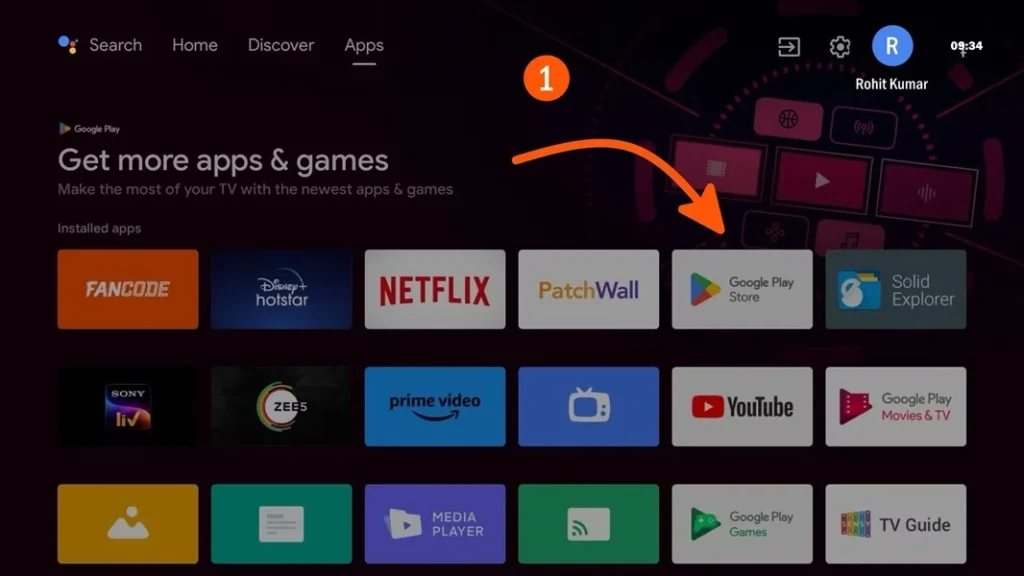
- افتح برنامج التنزيل: اكتب ”downloader app“ في شريط البحث. سيظهر خيار برنامج التنزيل الرسمي من AFTVnews. قم بتشغيل التطبيق من خلال النقر على زر التثبيت الموجود بجوار التطبيق.
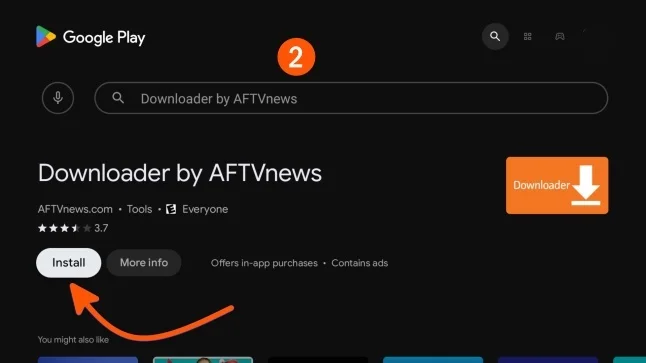
- أدخل عنوان URL: في شريط عنوان URL، اكتب رابط تنزيل تطبيق ASD Player. إذا ظهرت خيار إدخال رمز، أدخل الرمز 773516 واضغط على Enter.
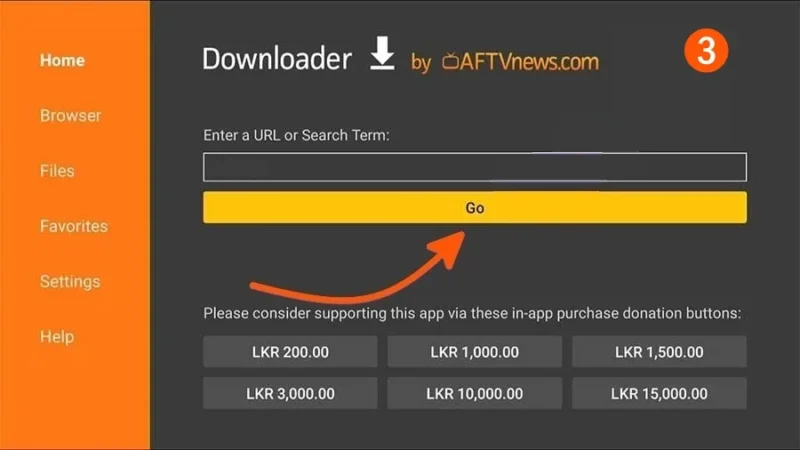
- تنزيل التطبيق: انتظر حتى يتم تنزيل تطبيق ASD Player بنجاح.
- تثبيت التطبيق: بعد التنزيل، انقر على زر التثبيت لإعداد تطبيق ASD Player على التلفزيون الذكي الخاص بك.
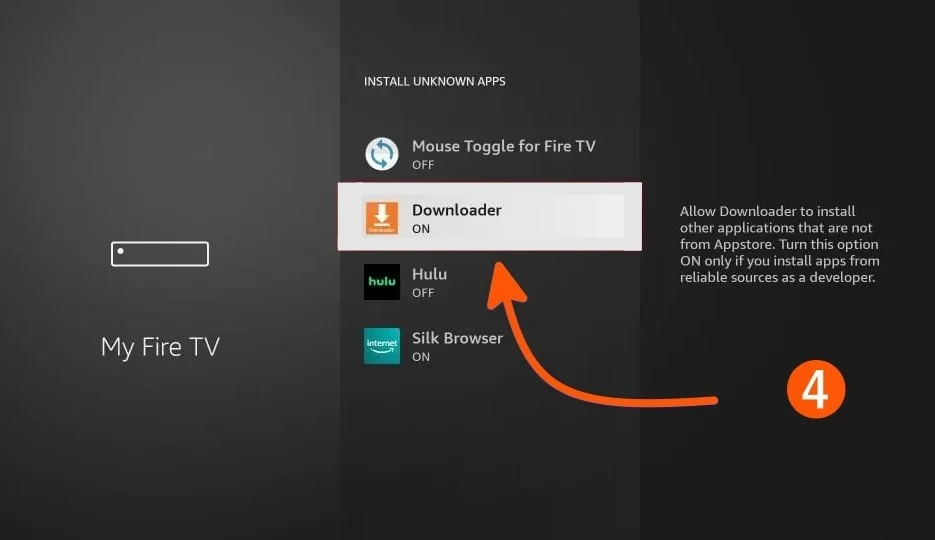
- تمكين المصادر غير المعروفة: بالنسبة إلى Android TV، انتقل إلى الإعدادات > تفضيلات الجهاز > الأمان والقيود > المصادر غير المعروفة وقم بتمكينها بالنسبة إلى Fire TV، انتقل إلى الإعدادات > My Fire TV > خيارات المطور > التطبيقات من مصادر غير معروفة وقم بتشغيلها.
- افتح ASD Player: بعد التثبيت، افتح التطبيق من قائمة التطبيقات.
- قم بإعداد ASD Player: لإكمال الإعداد، قم بالتسجيل وإنشاء حساب على ASD Player.
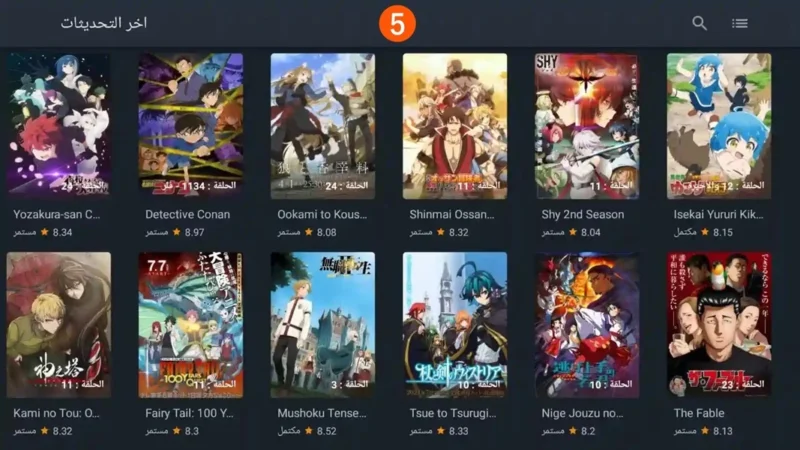
- استمتع: الآن يمكنك الاستمتاع بجميع تدفقات المحتوى عن طريق تسجيل الدخول إلى ASD Player.
مشغل ASD مقابل مشغلات الوسائط الأخرى
يقارن الكثير من الناس مشغل ASD بمشغلات الوسائط الشائعة الأخرى. فيما يلي مقارنة بسيطة:
| ميزة | مشغل ASD | اللاعبون التقليديون |
|---|---|---|
| واجهة | بسيط ونظيف | أحيانًا معقدة |
| الأداء | خفيف الوزن | يمكن أن يكون ثقيلاً |
| دعم التنسيق | واسع | يختلف |
| سهولة الاستخدام | مناسب للمبتدئين | يعتمد على التطبيق |
لماذا يعتبر ASD Player مثاليًا لأجهزة Android TV؟
ASD Player هو مشغل وسائط رائع لكل من هواتف Android وأجهزة التلفزيون الذكية. إنه سهل الاستخدام ومليء بالميزات، مما يجعله مثاليًا لترفيه منزلي أفضل.
جودة بث فائقة
يوفر ASD Player بثًا فائق الوضوح بدقة تصل إلى 4K حتى يمكن الاستمتاع به على أكمل وجه على Android TV. لذا، سواء كان بثًا مباشرًا للرياضة أو مقاطع فيديو، فإنه يضمن أفضل جودة ممكنة مع الاستفادة المثلى من التلفزيون.
سهولة التنقل على الشاشات الكبيرة
صُممت واجهة ASD Player للاستخدام على الشاشات الكبيرة، وتتيح التنقل السهل باستخدام جهاز التحكم عن بُعد الخاص بالتلفزيون. بفضل الفيديو بملء الشاشة، وأدوات التحكم البسيطة، والوصول السريع إلى المحتوى الخاص بك، توفر هذه الواجهة إدارة سلسة للوسائط على الشاشة الكبيرة.
توافق التلفزيون الذكي
من بين الإصدارات المبتدئة والمتطورة من أجهزة التلفزيون الذكية التي تعمل بنظام أندرويد، يقدم مشغل ASD خدمة سلسة للجميع، ويوفر تجربة وسائط متعددة فائقة الجودة على جميع الإصدارات المختلفة.
دعم الأجهزة الخارجية
يمكن للمستخدمين استخدام الأجهزة الخارجية بما في ذلك أجهزة USB والأقراص الصلبة وتشغيل المحتوى محليًا. توفر هذه الميزة خيارات للأشخاص الذين لا يستخدمون بالضرورة خدمات البث لاستهلاك الوسائط.
System Requirements and Supported Devices
يعمل ASD Player على مجموعة واسعة من الأجهزة. فيما يلي المتطلبات العامة:
- نظام التشغيل Android 5.0 أو أعلى
- اتصال إنترنت مستقر للتحديثات
- سعة تخزين خالية لا تقل عن 1 جيجابايت
- متوافق مع الهواتف الذكية والأجهزة اللوحية وأجهزة التلفزيون الذكية التي تعمل بنظام Android
نظرًا لخفة وزنه، فإنه يعمل بشكل جيد حتى على الأجهزة متوسطة المدى.
لماذا تختار هاتف ASD Player الذكي الذي يعمل بنظام Android؟
تتميز الهواتف الذكية التي تعمل بنظام Android بإمكانية التخصيص وتوفر العديد من التطبيقات. يعد ASD Player تطبيقًا متميزًا لأنه يعمل بشكل جيد ويدعم العديد من التنسيقات وسهل الاستخدام.
- تشغيل وسائط سلس: يتيح ASD Player تشغيل الفيديو بشكل سلس ومستمر من الملفات المحلية أو البث عبر الإنترنت أو الملفات الصوتية. ويضمن لمستخدميه أفضل أداء بغض النظر عن نوع الفيديو، سواء كان بدقة HD أو 4K، وفي معظم الحالات لا توجد مشاكل في التحميل أو التخزين المؤقت.
- دعم تنسيقات متعددة: ميزة أخرى فريدة لـ ASD Player هي قدرته على تشغيل عدد كبير من ملفات الوسائط المختلفة. فهو يسمح بأي نوع من الملفات بما في ذلك الفيديو (mp4، mkv، avi) والصوت (flac، mp3) والرسومات، وبالتالي لا يواجه المستخدم أي مشاكل في عدم توافق الوسائط.
- واجهة مستخدم محسّنة: يتميز التطبيق بتصميم أنيق وبسيط للغاية، وهو أيضًا سهل الاستخدام للغاية. لن يواجه المستخدمون الجدد أي صعوبة في استخدام واجهة التطبيق. يمكن للمستخدمين أيضًا التحكم في العناصر المختلفة لوسائطهم من خلال ميزات مثل سرعة التشغيل والترجمة والتحكم في مستوى الصوت.
- دعم متعدد اللغات وترجمة: جمهور ASD Player دولي، حيث يدعم عدة لغات. تتوفر الترجمة أيضًا بلغات مختلفة، وهو أمر رائع للجمهور الأجنبي أو للأشخاص الذين يفضلون المحتوى بلغات أخرى.
هل استخدام مشغل ASD آمن؟
Sالسلامة مهمة جدًا عند تثبيت أي برنامج. يعتبر ASD Player آمنًا بشكل عام عند تنزيله من مصادر موثوقة.
فيما يلي بعض النصائح المتعلقة بالسلامة:
- تجنب التنزيل من مواقع الويب غير المعروفة.
- تحقق من أذونات التطبيق قبل التثبيت.
- حافظ على تحديث جهازك.
- استخدم برنامج حماية من الفيروسات إن أمكن.
يمكن أن تساعدك هذه الخطوات في الحفاظ على أمان جهازك.
نصائح لتحسين أداء لاعبي ASD
إذا كنت ترغب في الحصول على أفضل تجربة، جرب هذه النصائح:
- أغلق التطبيقات التي تعمل في الخلفية أثناء مشاهدة مقاطع الفيديو.
- استخدم الإصدار المحدث من ASD Player.
- امسح ذاكرة التخزين المؤقت بانتظام.
- اضبط جودة الفيديو وفقًا لأداء الجهاز.
هذه التغييرات الصغيرة يمكن أن تحسن سرعة التشغيل وتقلل من التأخير.
المشاكل الشائعة وحلولها
- الفيديو لا يعمل
- في بعض الأحيان، قد لا يتم تشغيل مقاطع الفيديو بسبب برامج الترميز غير المدعومة أو الملفات التالفة. حاول تحديث المشغل أو التحقق من الملف.
- لا توجد مشكلة في الصوت
- تحقق من مستوى صوت الجهاز وإعدادات الصوت داخل المشغل.
- الترجمة لا تظهر
- تأكد من أن اسم ملف الترجمة يتطابق مع اسم ملف الفيديو.
مستقبل مشغل ASD
مع استمرار نمو الترفيه الرقمي، تزداد أهمية مشغلات الوسائط مثل ASD Player. يركز المطورون على تحسين الأداء وإضافة ميزات ذكية وجعل التشغيل أكثر سلاسة.
في المستقبل، قد يتضمن ASD Player خيارات أكثر تقدمًا مثل:
- دعم البث عبر الإنترنت
- الوصول إلى الوسائط السحابية
- ميزات تخصيص أفضل
هذه التحديثات يمكن أن تجعله أكثر فائدة للمستخدمين اليوميين.
الأسئلة الشائعة
ما هو ASD Player؟
ASD Player هو تطبيق مشغل وسائط يتيح للمستخدمين مشاهدة مقاطع الفيديو وروابط البث ومحتوى قوائم التشغيل بسهولة على الأجهزة المحمولة أو أجهزة سطح المكتب.
هل استخدام ASD Player مجاني؟
نعم، عادةً ما يكون تنزيل واستخدام ASD Player مجانيًا. قد تعتمد بعض الميزات على الإصدار أو النظام الأساسي الذي تستخدمه.
كيف يمكنني إضافة مقاطع فيديو أو قوائم تشغيل في ASD Player؟
يمكنك إضافة محتوى عن طريق لصق عنوان URL للفيديو أو تحميل قائمة تشغيل M3U أو فتح ملفات فيديو محلية من ذاكرة جهازك.
لماذا لا يتم تشغيل الفيديو الخاص بي؟
قد يحدث هذا بسبب تنسيقات غير مدعومة أو روابط معطلة أو بطء الإنترنت أو إصدارات قديمة من التطبيق. حاول تحديث المشغل أو تحديثه.
هل يدعم ASD Player الترجمة؟
نعم، تدعم العديد من الإصدارات الترجمة الخارجية مثل ملفات SRT. يمكنك تمكين الترجمة من إعدادات المشغل.
هل برنامج ASD Player آمن؟
قم بتنزيل ASD Player فقط من مصادر موثوقة أو مواقع ويب رسمية لتجنب الإصدارات المعدلة أو غير الآمنة.
هل يمكنني استخدام ASD Player على Android والكمبيوتر الشخصي؟
نعم، يتوفر ASD Player بشكل عام لأجهزة Android، كما أن بعض الإصدارات أو البدائل تعمل على أجهزة الكمبيوتر الشخصية أيضًا.
لماذا يتم تشغيل الصوت ولكن لا يظهر الفيديو؟
قد يحدث هذا إذا كان برنامج ترميز الفيديو غير مدعوم أو إذا تسبب تسريع الأجهزة في حدوث مشكلات. حاول تغيير إعدادات المشغل.
كيفية إصلاح مشاكل التخزين المؤقت في ASD Player؟
تحقق من سرعة الإنترنت لديك، وقلل جودة الفيديو، أو امسح ذاكرة التخزين المؤقتة، أو انتقل إلى خادم أسرع إن أمكن.
الخلاصة
ASD Player هو مشغل وسائط بسيط وخفيف الوزن وسهل الاستخدام مصمم لتشغيل الفيديو والصوت بسلاسة. واجهته النظيفة ودعمه للتنسيقات المتعددة وأدوات التحكم السهلة تجعله خيارًا رائعًا للأشخاص الذين يرغبون في تجربة ترفيهية خالية من المتاعب.
سواء كنت تشاهد الأفلام أو تستمع إلى الموسيقى أو تشغل مقاطع فيديو تعليمية، يوفر ASD Player حلاً موثوقًا دون تعقيد الأمور.
إذا كنت تريد مشغل وسائط سهل الفهم ويعمل بسلاسة ولا يبطئ جهازك، فإن ASD Player يمكن أن يكون خيارًا جيدًا.